


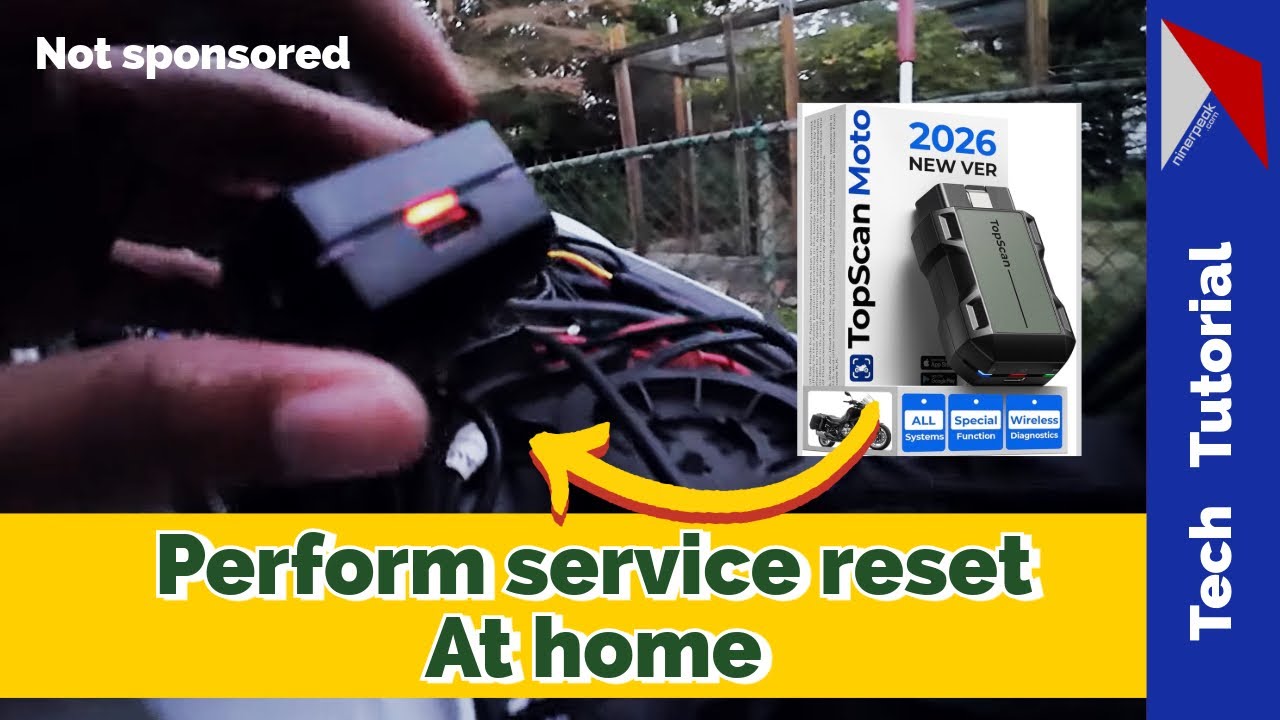
You just finished your own oil and filter change, everything is torqued and clean, and the dash is still nagging you that service is due. On a BMW, the usual answer is “buy a GS-911.” That is roughly $400, and it comes with a VIN limit. That felt kind of steep and ridiculous to me just to clear a reminder, so I tried a cheaper option on my 2024 BMW 1300 GS: a TopScan OBD-II scanner that cost about $100 and has no VIN restriction.
Spoiler: it worked. The reminder is gone and the next service is set. It wasn’t completely smooth on the first try, though, so here is the whole process, including the two things that tripped me up.
Why Skip the GS-911?
If you do your own maintenance, resetting the service reminder is the one step you can’t do with a wrench. The GS-911 is the tool most BMW riders reach for, but at around $400 with a VIN limit, it is a lot of money for something I only need after an oil change. You do not need a GS-911 just to reset service reminders.
The TopScan is a small Bluetooth dongle that plugs into the bike’s OBD-II port and talks to an app on your phone. Mine was just about 100 bucks, and there is no VIN number restriction on it.
Plugging In and Activating the Scanner
Once the TopScan is plugged into the OBD-II port, it makes one beep and a red light comes on. Then it’s over to the phone app.
- Create your account first. I set up my account in the app at home before heading out to the bike, which saves some fiddling in the garage.
- Add the VCI. The app asks you to activate the VCI (the scanner itself) and wants a serial number. The serial number is printed on the device. Enter it, activate, and you’ll see “New device added.”
- Download the BMW software. Choose motorcycle diagnostics, then BMW. The download was about 745 MB, so do this on a good Wi-Fi connection. Once it’s installed, tap it and hit continue through the setup screens.
Connecting Over Bluetooth
Next, go into the app’s Bluetooth connection and pick the TopScan Moto device from the list. When it connects, a blue light comes on next to the red one, and the data light starts blinking. That’s how you know the phone and the scanner are talking.
The Two Hiccups: VIN Read and Ignition
Here is where it got a little bumpy. I went to automatic diagnostics and tapped read to acquire the VIN, and it failed. That was a bummer at first, but there is an option to enter the VIN manually. Once I typed it in, the app knew exactly what bike it was: a 1300 GS, 2024 model. I hit accept and it started establishing communication with the bike.
Honestly, this part was slow, slower than I expected, since the same kind of scanner on my car just works and works fast. Then the automatic connection failed and the app asked me to follow some instructions with the ignition. That’s when I realized the app had told me to turn the bike on earlier and I hadn’t done it.
As soon as I switched the ignition on, everything moved much faster. It connected, the auto scan came back, and we were in business: it is compatible with the 1300 GS. So for this to work you need all three:
- The motorcycle turned on
- The scanner plugged into the OBD-II port
- The scanner connected to the phone app over Bluetooth
Resetting the Oil Service Reminder
The app shows a lot of options, but I didn’t want to change anything else on the bike. The one you want is under Hot Functions, then Oil Reset.
- Go to Hot Functions and choose Oil Reset.
- Continue to set the service interval indicator and service function.
- Adjust the remaining values. It looks like the app only lets you change one value at a time, so do the distance first.
- For remaining distance I put in 4,000 miles, then hit return.
Then the service message on the dash went away on its own. Superb. The service date showed 9/2026, so it’s within a year. I went with 4,000 miles because I had already ridden about 500 miles after my oil change before I got this device. After that the app runs its end-of-service program, you wait a moment, and it’s done.
Is It Worth It?
For what I need, absolutely. The oil reset function is free in the app. There are other functions you can pay for, but I don’t really need them. For about $100, with no VIN restriction, it handles the things I do on this motorcycle myself: my own service, oil changes, and clearing that reminder afterward.
- Price: about $100, versus around $400 for the GS-911
- VIN limit: none
- Oil reset: free, under Hot Functions
- Downsides: the automatic VIN read failed for me, and the connection is slow until the ignition is on
The message is gone, so I don’t need the $400 GS-911.
Wrapping Up
If you do your own oil changes on your BMW, you don’t have to spend GS-911 money just to clear the service reminder. Plug in, activate the scanner, enter the VIN manually if the auto read fails, turn the ignition on, and go to Hot Functions, then Oil Reset.
Watch the full walkthrough above to see every screen. If it helped, hit the like button and subscribe to the channel at youtube.com/@ninerpeak for more moto how-tos, gear reviews, and ride vlogs. Peace.
Related: If you like long rides, read about my first BMW MOA Rally in Lebanon, Tennessee, or go off-road with my NEBDR Section 2 guide.





2 thoughts on “Reset BMW 1300 GS Service Reminder Without a GS-911”